Change orders
Change orders your client approves before you start.
When the job grows, write the extra work as a change order. Your client reads and signs it on their phone, and the new amount joins the job balance and the next invoice.
Change orders are a Pro feature, and free on your first job.

In plain words
The problem
The work grows. A client asks for one more outlet, and by the end nobody remembers who said yes to what, or the price.
What you do
When something changes, write a change order. It says what is new and what it costs. Your client approves it before you do the extra work.
What you get
An approved change is added to the job total. A change still waiting is never counted as approved. The final bill shows every change on its own line.
How it works

Read this video as text
- Need to change the price? Send a change order.
- Your client approves it first. Until then, it is not counted.
- 1
Add the change
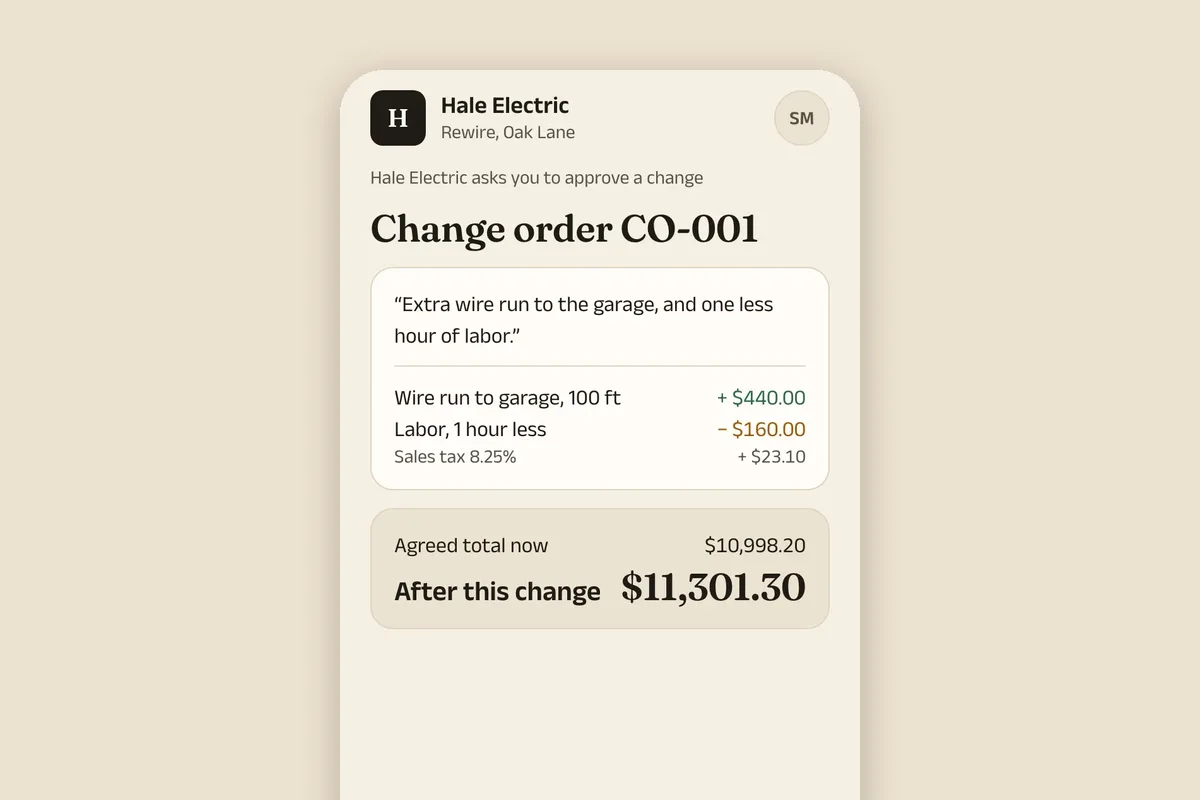
Describe the extra work and its price, or take something out with a negative line.
- 2
Your client decides
They approve and sign, or ask for changes. Until then it is shown as waiting, not agreed.
- 3
It joins the balance
The approved amount is added to the job. The next progress or final invoice includes it.

What your client sees
The original total, the change and the new total, so the decision is clear. They sign with their finger or mouse.
The rules that protect you both
- Change orders can be added until the final invoice is sent.
- The final invoice cannot be sent while a change order is still waiting.
- Only one change order waits for an answer at a time, so nothing gets mixed up.
Questions
Why can't I add a change order after the final invoice?
Once the final invoice is sent, the job price is settled. New work becomes a new estimate, so the paper trail stays clear.
Can a change order lower the price?
Yes. Add a line with a negative amount, such as a fixture the client bought themselves.
What if my client says no?
Mark it declined, or your client declines it. Nothing changes in the balance.
Does the change show on the invoice?
Yes. The next invoice lists each approved change on its own line.
Send your first estimate today.
Get startedFree plan available. No credit card for Free.