
Estimating and invoicing software for service businesses From the first estimate to the final payment.

Send estimates your client signs, take a deposit, send change orders and progress invoices, then bill the final invoice. Your client approves, signs and pays in their own web portal. We never take a cut.

Free to start: 5 invoices and 5 estimates a month, and every Pro feature on your first job. No card needed. Going Pro later? The 6-month, yearly and Lifetime plans come with a 14-day full refund. Works in any browser on your computer, tablet or phone. The iPhone and Android apps are being tested now and will be available before the end of 2026.

Read this video as text
  1. Start a job for your client.
  2. Add what it costs you. See your margin before you quote.
  3. Below your target? It shows the price that gets you there.
  4. You choose the price. Your margin updates as you type.
  5. Send it. Michael gets his own private link.
  6. Michael opens it on his phone, reads it and signs.
  7. Approved. You see it at once.
  8. Ask for a deposit. See it paid.
  9. Work changes? Write a change order.
  10. Send it for approval. Nothing is added until Michael says yes.
  11. Michael approves the change on his phone.
  12. Final invoice: what is left, line by line. Paid when you confirm it.
  13. See what the job really earns, against your target.
  14. Estimates to invoices. Every step connected.

Built for the people who do the work

Pick your trade to see how a job runs on paper and where InvoiceWren helps.

See everyone we serve →

Pricing & profit

Quote faster. Know what you’ll keep.

Reuse your costs, check your margin, and compare prices before you send an estimate.

Try it free

Your costs and margins stay private.

Sample estimatePanel upgrade

Reuse your job costs.

Start with saved materials, labor, and overhead.

Saved costs added

Materials
$1,000
Labor
$650
Overhead
$150
Estimated job cost
$1,800

One job, start to finish

$2,100 still owed, and you can see why.

The estimate was $4,000. The client approved $600 of extra work. $2,500 is paid. InvoiceWren keeps all of it together, so the balance is never a guess.

The job

Agreed in EST-0014$4,000.00
Change order CO-1+ $600.00
Paid so far− $2,500.00
Still owed$2,100.00
  • $0our cut of your payments
  • First jobevery Pro feature, free
  • Lockedyour price, while you stay
  • Yoursexport all your data, any time
Read this video as text
  1. Need to change the price? Send a change order.
  2. Your client approves it first. Until then, it is not counted.

The whole job

From the first estimate to the final invoice.

One place for the whole job. Your client sees every step on their own web page.

  1. Estimate.

    Send your price. Your client signs it on their phone.

  2. Deposit.

    Ask for some money first. Your client can pay right after signing.

  3. Change order.

    The work changed? Send the new price. Your client says yes before you start.

  4. Progress invoice.

    Big job? Bill it in parts, as you finish each part.

  5. Final invoice.

    One tap makes the final bill from your signed papers. Nothing to type again.

  6. Paid.

    Your client pays and taps “I’ve paid”. You confirm it. They get a receipt.

  7. Every step is saved with its date. If there is ever a question, the answer is in writing.

Look the part

Same job. Same price. A better first impression.

A price in a text message is easy to forget and easy to argue with. A numbered estimate with your logo, your license number and your client’s signature is not.

Before

Nov 05 · 9:12 AM

Hey Michael, the rewire will be around 10k. Let me know

ok sounds good. does that include the garage?

yeah we can sort that out

Easy to forget. Easy to argue about.

With InvoiceWren

Clear. Numbered. Signed.

Every paper matches.

Your logo and details on every estimate, change order, invoice and receipt. Totals and sales tax worked out for you. Numbered and dated, in order.

Your client’s side

Your clients get their own web portal.

Big service companies build an app for their customers. You get your own web portal, with nothing to build. Your client opens it with their mobile number or an email code. No download, no password.

Read this video as text
  1. Your client opens their page with their mobile number.
  2. They read the estimate and sign with a finger.
  3. They pay, and download their receipt, from the same page.
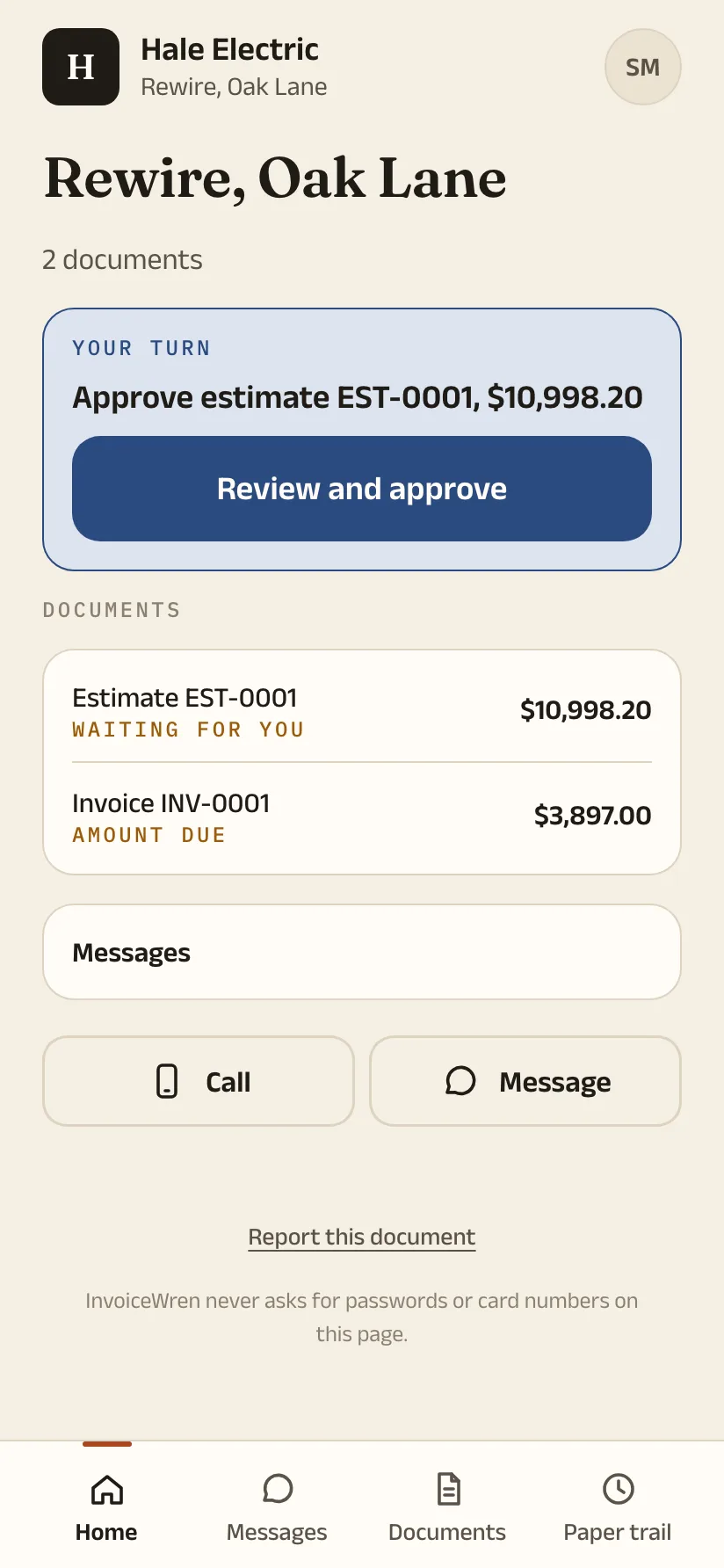
  1. The client portal home page showing the job, the estimate waiting for approval, and Call and Message buttons 01

    One page for the job

    Every estimate, invoice and message for the job. Only your client gets in.

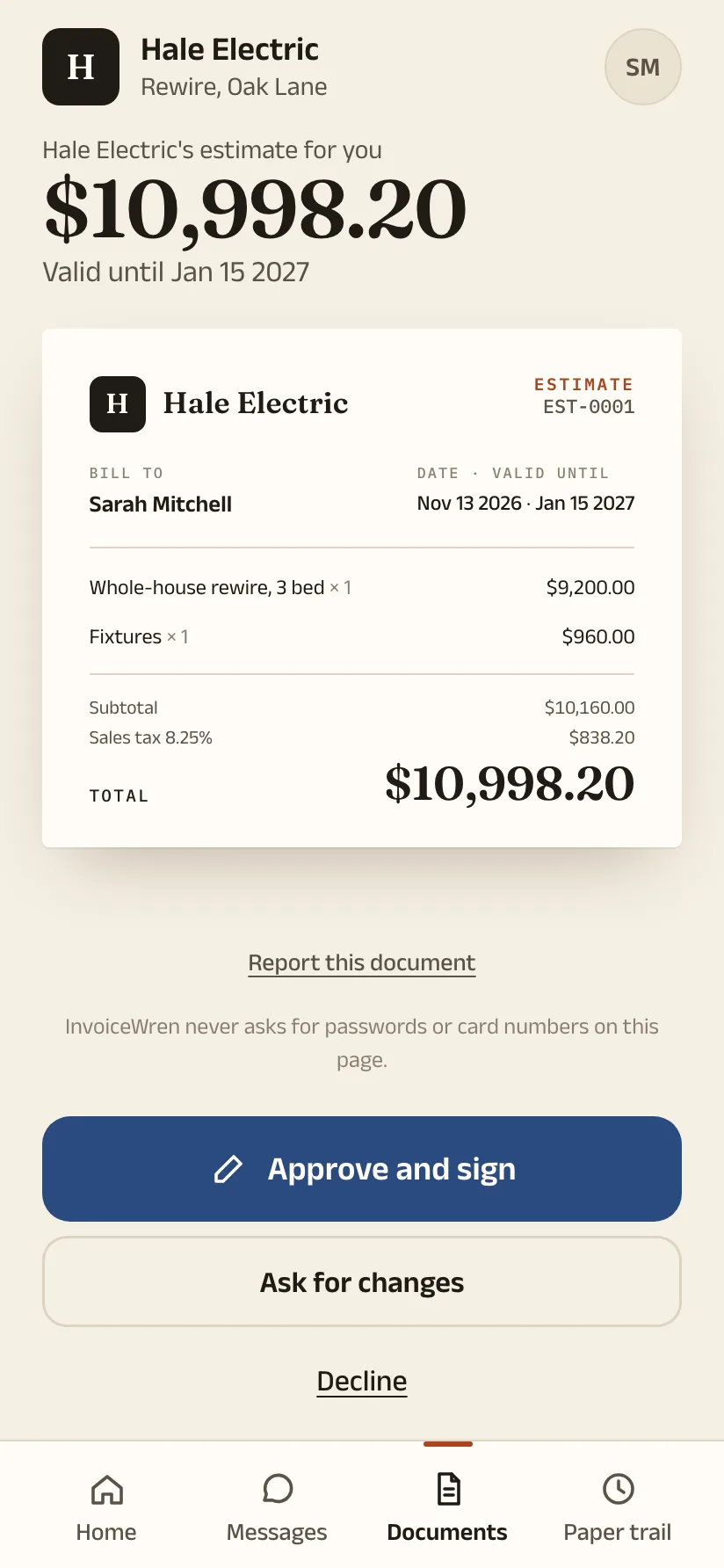
  2. The client portal showing an estimate with the buttons Approve and sign, Ask for changes and Decline 02

    Reads and signs

    They approve your estimate and sign with a finger.

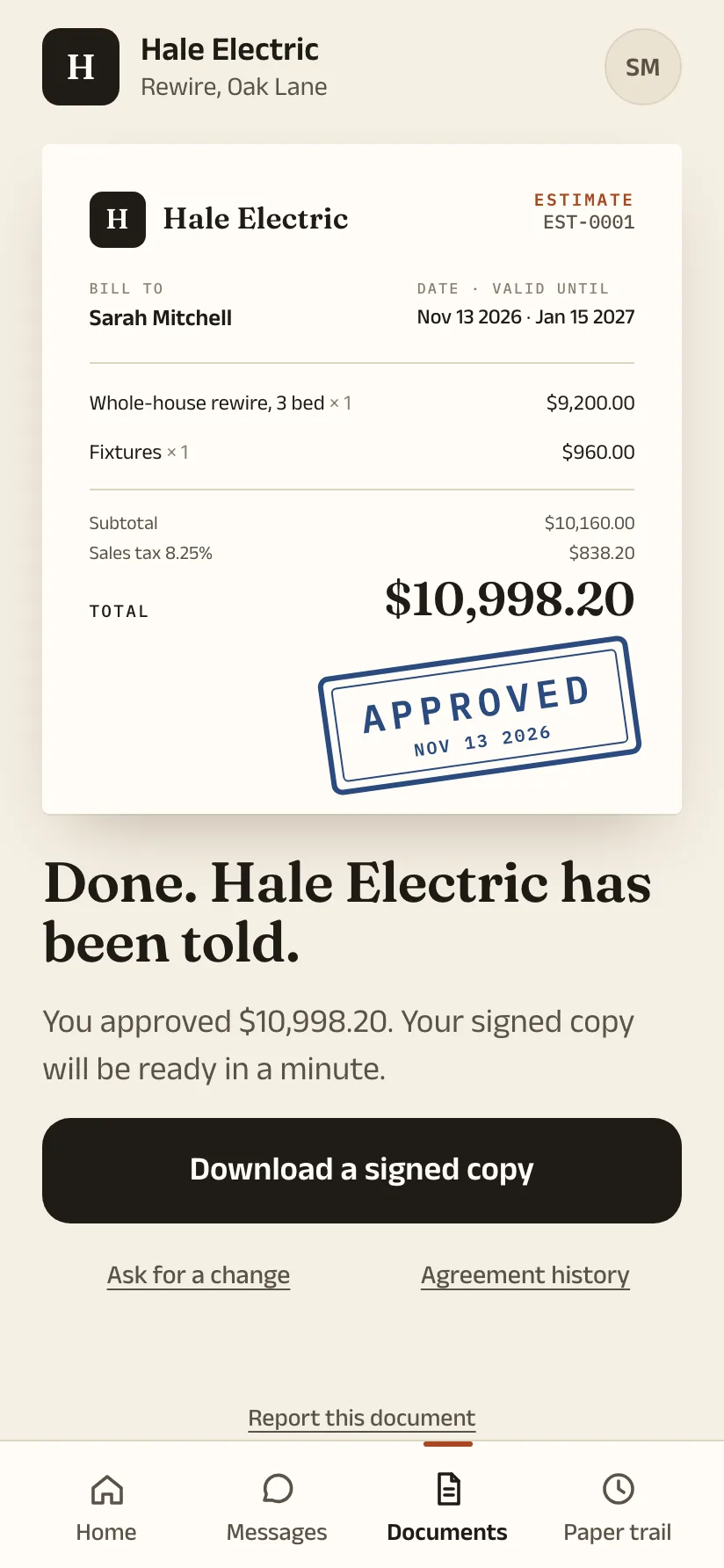
  3. The client portal after signing, with the Approved stamp and a Download a signed copy button 03

    Gets a signed copy

    Right after signing they can download it, or ask for a change.

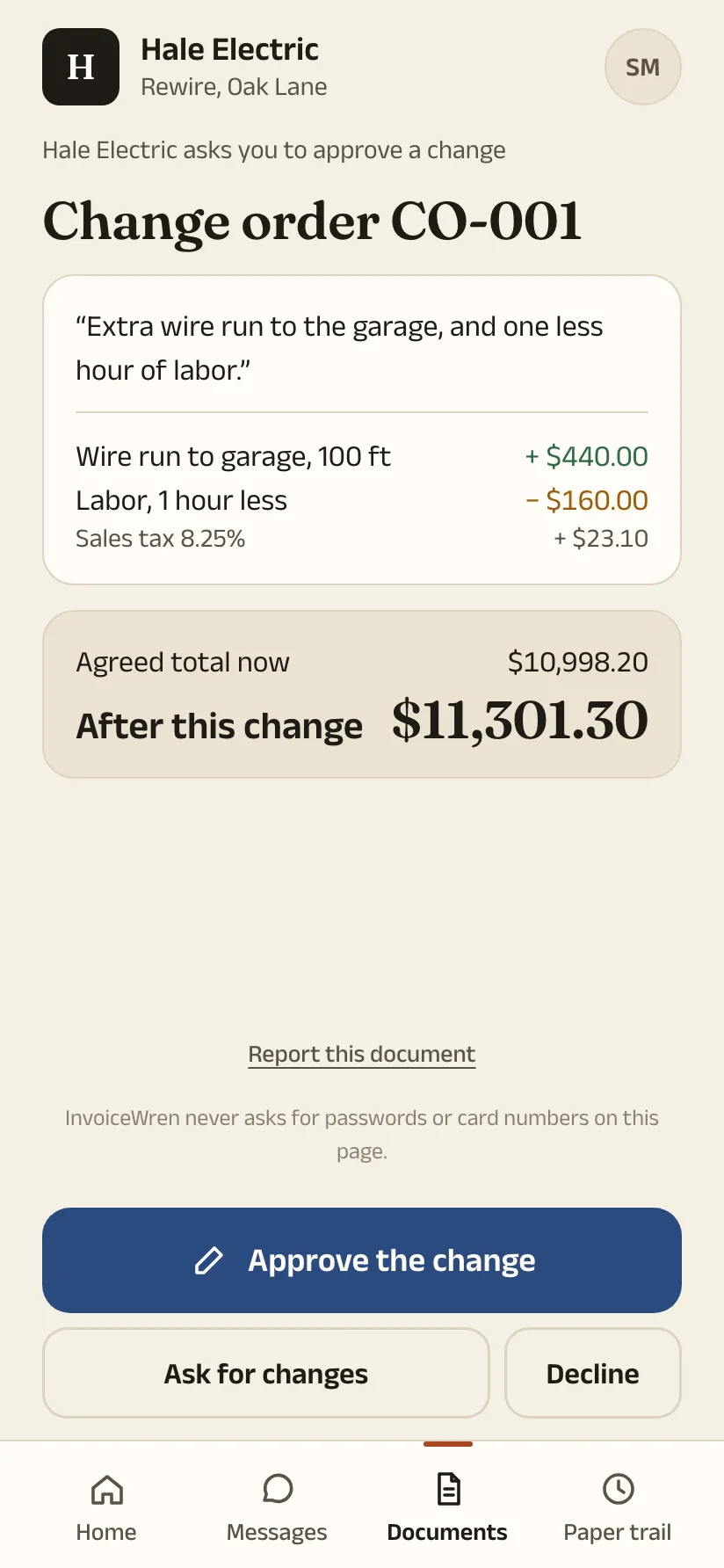
  4. The client portal showing a change order with the new total and an Approve the change button 04

    Approves changes first

    Extra work? They see the new total and say yes before you start.

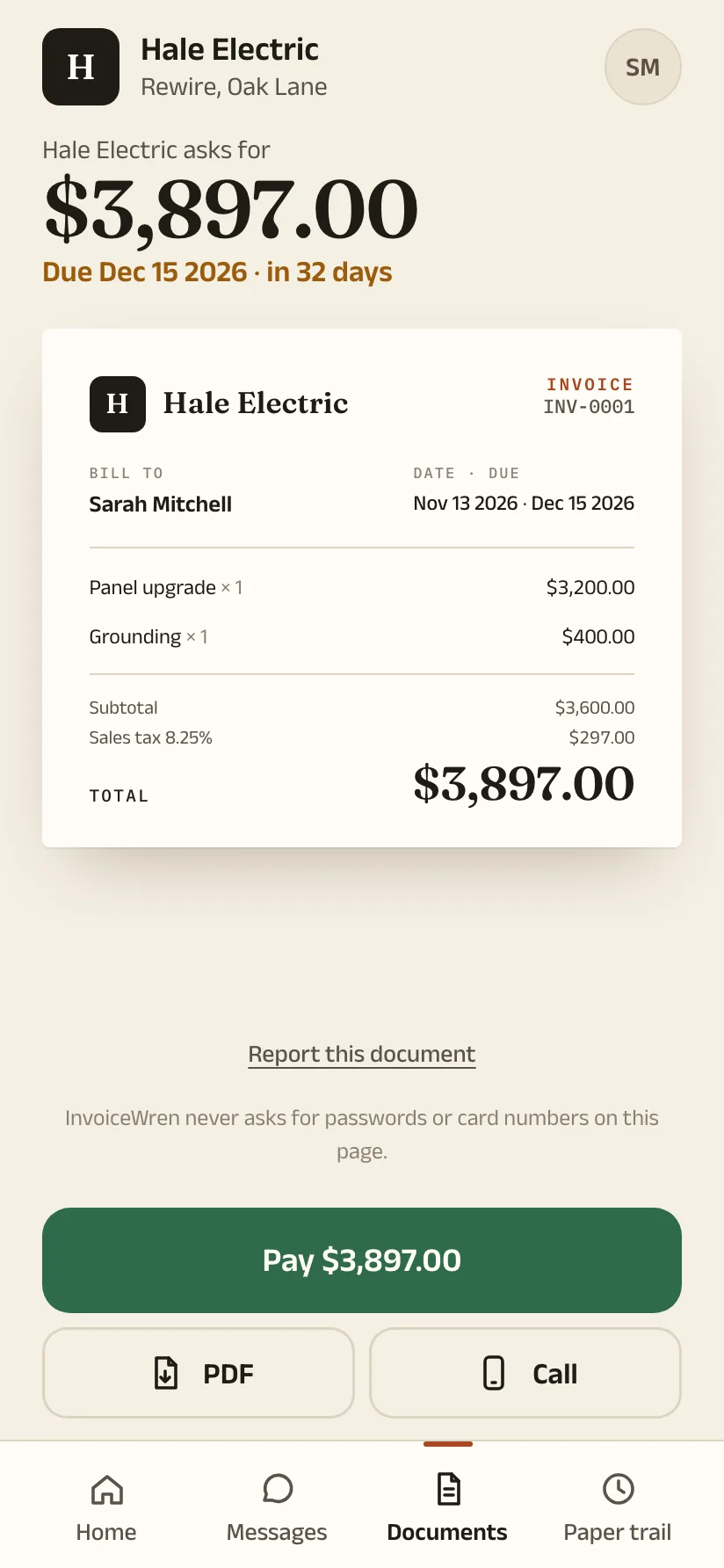
  5. The client portal showing an invoice with the amount due and a Pay button 05

    Pays their way

    Zelle, bank transfer, check or your card link. If your bank details change, they are warned first.

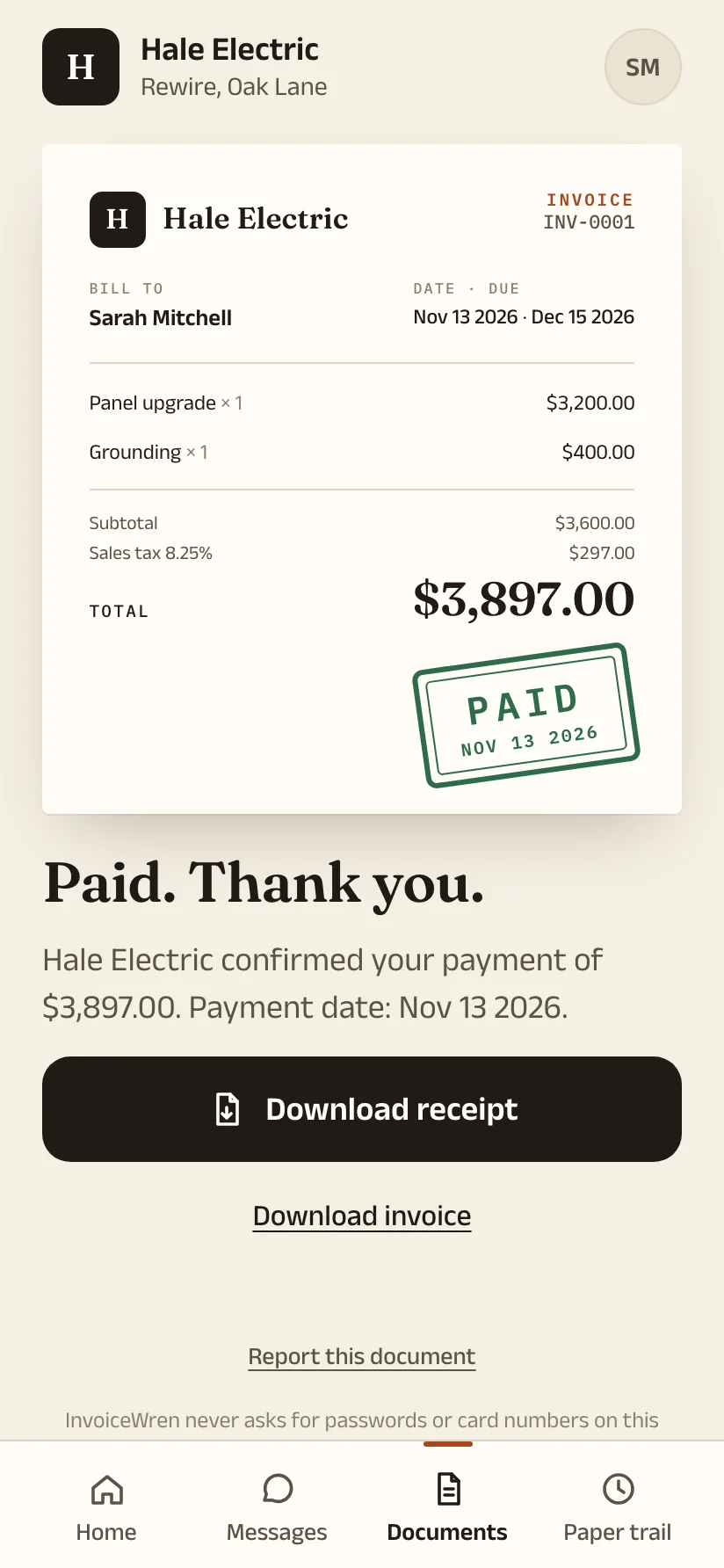
  6. The client portal after payment, with the Paid stamp and a Download receipt button 06

    Keeps the receipt

    When you confirm the payment, they can download the receipt.

Your client can also ask for changes, see the history of the job, and call or email you from the same page.

Client reminders

We follow up, so you do not have to.

InvoiceWren emails your client polite payment reminders and estimate follow-ups, from your business name. They stop the moment your client pays, and you stay in control.

How reminders work

Read this video as text
  1. Turn on reminders when you send an invoice.
  2. We email your client on a schedule you can change or pause.
  3. Your client gets a plain email from you, with a button to open the invoice.
  4. When your client pays, the reminders stop.
  5. Every email shows in the job’s paper trail.

Written into our terms

Five promises, in plain words.

Invoice apps often get worse once you depend on them. These five are part of our terms, so they are not just words on a website.

  1. 01

    We never take a cut of your payments.

    Your client pays you directly. No fee from us, on any plan. If you add your own Stripe link, Stripe’s fee still applies.

  2. 02

    Free means free.

    Send 5 invoices and 5 estimates a month, by link or PDF, free, for as long as you like. Drafts are unlimited. If you reach 5, we tell you before you start writing, never after.

  3. 03

    Your price never goes up while you stay.

    The price you pay when you subscribe is the price you keep, for as long as you stay subscribed.

  4. 04

    No feature ever moves to a higher plan.

    What you have today stays on your plan. We never take things away to sell them back to you.

  5. 05

    Your data is yours.

    Export every invoice, client and payment at any time, free, on every plan. We never sell your data.

These promises are part of our Terms of Service.Part of our Terms of Service.Read our promises →

Pricing

Start free. Go Pro when you get busy.

Start free with 5 invoices and 5 estimates a month, and every Pro feature on your first job. Pro runs every job for you: unlimited invoices and estimates, reminders emailed for you, change orders, progress invoices and a client portal.

Free

Make, send and get paid.

$0for good
Start free

No credit card.

  • Send 5 invoices and 5 estimates a month, by link or PDF
  • Up to 3 open jobs and unlimited drafts
  • Estimates your client signs, deposits and final invoices
  • Your first job has every Pro feature free, job profit included
  • Every device, synced
  • Export everything, any time

Best value for money

Pro

Run every job, from estimate to final payment.

$127a year
Choose Pro

Billed $127 once a year, about $10.58 a month. Saves $28.64 against monthly. Cancel the renewal any time in the app. Full refund if you ask within 14 days.

  • Send as many invoices and estimates as you need
  • Reminders and estimate follow-ups emailed for you, until they pay
  • Job profit: your costs and your margin on every job
  • Change orders your client approves, on every job
  • Progress invoices, stage by stage
  • The whole job in one place for your client: every document, payment and message
  • As many open jobs as you need

No subscription

About$0.44a day over 5 years

Lifetime

Pay once. Pro for as long as InvoiceWren runs.

$799once

Founders offer. Sold until Dec 31 2026 at midnight Pacific Time.

Buy Lifetime

One payment of $799, about 6 years of the yearly plan. Nothing renews. Full refund if you ask within 14 days.

  • Everything in Pro, kept for good
  • Every improvement to those features, at no cost
  • 50 GB for photos, files and PDFs
  • New add-ons 25% off, for life
  • Nothing to renew and nothing to cancel

Your price never goes up while you stay subscribed.

14-day full refund on the 6-month, yearly and Lifetime plans. How refunds work

Prices in US dollars · Tax may be added at checkout, which Paddle runs for us. Compare the plans in full
An electrician shows an estimate on a tablet to two homeowners in their kitchen

Agree on the price before the work starts.

Show the estimate on the spot. Your client reads it, signs on their phone, and you both know what was agreed. When the job grows, a change order is signed before you start the extra work.

Compare

InvoiceWren compared with other estimate and invoice apps.

We checked what Joist, Jobber, Housecall Pro, HoneyBook and Wave offer today. Here is how that lines up with what InvoiceWren does.We checked what Joist and Jobber offer today.

InvoiceWren compared with Joist, Jobber, Housecall Pro, HoneyBook and Wave, checked on Nov 05 2026
What you getWhat you get InvoiceWrenJoistJobberHousecall ProHoneyBookWave
Free plan Yes · 5 invoices a monthNoNo · 14-day trialNo · 14-day trialNo · 30-day trial Yes · no e-sign
Plan with the most of these features (billed yearly) $10.58 · Pro$26.67 · Elite$99 · Connect$59 · Basic$29 · Starter$15.83 · Pro
Estimates your client signs YesPartly Yes Yes YesNo
A deposit on the estimate Yes YesPartly YesNot foundPartly
Change orders your client approves YesElite plan onlyNoNoNoNo
Progress invoices, stage by stage YesMilestones YesNot foundPartlyNot found
Client portal, no password YesNot found Yes Yes YesNot found
Reminders emailed to clients YesNo Yes Yes YesPro plan

We read each company’s own pricing and help pages on Nov 05 2026. Prices are US dollars a month, billed yearly, for the plan with the most of these features that we could verify. No plan we checked had every feature. “Partly” means a limit applies, for example one plan only. “Not found” means we could not find it on their pages. Their plans may have changed since then.We read their own pricing and help pages on Nov 05 2026. Prices are a month, billed yearly, for the plan with the most of these features we could verify. “Partly” means a limit applies. “Not found” means we could not find it. Their plans may have changed since then.

Manage the whole job in one app.

Start free
InvoiceWren A note from our founder

Why we built InvoiceWren.

Dear business owner,

Big companies have always had better paperwork: clear estimates, signed changes, and an app for their customers. Independent businesses got the leftovers: invoice caps, payment fees and prices that keep going up.

InvoiceWren is built for everyone who runs a business and bills for their own work. Your work is as good as anyone’s. Your paperwork should show it.

Every promise on this page is written into our terms. They are not just words on a website.

Sincerely,

AbrarFounder, InvoiceWren

Questions? Email hello@invoicewren.com. We try to reply within 48 hours.

Ready for your next job?

Start free with 5 invoices and 5 estimates a month. Your first job has every Pro feature. No card needed.

Need to send an invoice today? Use our free invoice generator →

Cookie settings

You choose what this site may store on your device. You can change this at any time with “Cookie settings” in the footer.

Your choice Remembers your answer so we do not ask again. It stays in this browser, it is not a cookie, and it is never sent to us or to Google.
Always on
Google Analytics counts visits, the pages people use and downloads. It sets the cookie _ga and a second one that starts with _ga_, kept for up to 13 months. What you type into an invoice is never sent.

Turning analytics off stops new counting and removes its cookies from this browser. It does not delete counts we already have. More in the privacy policy and the cookie policy.